REVIEW · NEW SOUTH WALES
The Virtual Solar System Highlights: A Self-Guided Driving Tour
Book on Viator →Operated by VoiceMap Audio Tours · Bookable on Viator
Coonabarabran turns a drive into a scale lesson. I love the giant 3D planet billboards along the Virtual Solar System Drive, and I really enjoyed hearing Marnie Ogg and special guest Fred Watson on the route. The only real drawback to plan for is that the audio relies on your smartphone setup, so if your directions or GPS act up, you may need to lean on a quick map.
This is a self-guided, one-car-or-one-group style astronomy outing in New South Wales. You can do it straight through in about an hour, or take your time at the planet stops without feeling rushed. It ends at Siding Spring Observatory, where you can then buy a separate audio tour if you want to keep going.
In This Review
- Key Points You Should Know Before You Go
- Astronomy Road Trip Base: Why Coonabarabran Works
- Starting at the Visitors Centre: Setting Up VoiceMap Without Stress
- The Planet Billboards: What You’ll See on the Virtual Solar System Drive
- How the stops work (and why it matters)
- The Audio Stars: Marnie Ogg and Fred Watson on the Drive
- Timing It Right: From 1 Hour to a Slower, Better Tour
- Route Reality Check: Driving Tips When the App Feels Off
- Ending at Siding Spring Observatory: What’s Included vs. What You Add
- Price and Value: $6.99 Per Group Adds Up Fast
- Who Should Book This Solar System Drive
- Should You Book It?
- FAQ
- Where does the Virtual Solar System Highlights driving tour start and end?
- How long does the driving tour take?
- What’s included in the $6.99 per group price?
- What do I need to bring?
- Does it work offline?
- Is this tour private?
- Is this experience refundable if plans change?
Key Points You Should Know Before You Go
- VoiceMap GPS playback (offline works too): audio, maps, and geodata are available without cell service.
- Start at the Coonabarabran Visitors Centre: easy to find, and the tour kicks off with setup instructions.
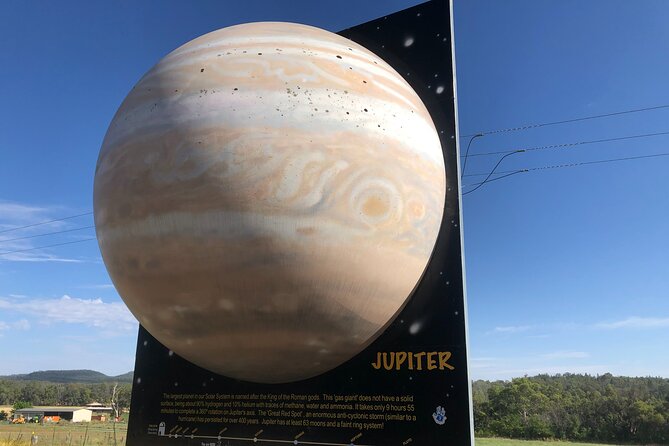
- You’ll see 6 of 9 planet models: huge, colourful 3D billboards give you a real sense of scale.
- Expert commentary included on the drive: Marnie Ogg (Dark Sky Traveller) and Fred Watson (Astronomer-in-Charge for 20 years) are part of the audio.
- Flexible pacing: you control when you start, when you pause, and when you finish.
- Low cost for a private group: it’s $6.99 per group (up to 15), which is great for families or a small road-trip crew.
Astronomy Road Trip Base: Why Coonabarabran Works
If you’re trying to understand why this part of NSW is so tied to astronomy, Coonabarabran is a smart launch point. It’s the kind of place where the sky theme isn’t a gimmick—it’s the reason people build routes, collect stories, and take drives specifically to look up.
This tour also works well as a “break” day. Even if you’re not spending hours at telescopes, you still get the emotional hit of space: the visuals of the planets, the idea of distance, and the voices of people who’ve spent their lives around major observatories. It’s not just entertainment. It’s education you can absorb while you’re actually moving through the countryside.
You can also read our reviews of more guided tours in New South Wales


Starting at the Visitors Centre: Setting Up VoiceMap Without Stress
The tour begins outside the Coonabarabran Visitors Centre on Newell Hwy. After you book, you get a ticket with a unique code under Before You Go. Your job is simple: install the VoiceMap app on your phone, enter the code, then use the app’s turn-by-turn guidance.
Here’s what I’d plan for before you roll out:
- Bring your phone charged. This is a driving tour, so you’ll likely keep your screen on for direction checks.
- Use headphones or phone audio. The tour doesn’t include headphones, so decide what’s comfortable for you and your group.
- Check your settings early. If VoiceMap is being fussy about playback or GPS, it’s far easier to troubleshoot before you’re trying to drive and find your first planet billboard.
One important practical note: the experience is designed around the app’s GPS playback. That means if your phone’s location is slow to lock on, you might feel like the route is off. When that happens, switch to the most basic troubleshooting mindset—confirm you’re in the right starting zone, then follow what the app is telling you to do next.
The Planet Billboards: What You’ll See on the Virtual Solar System Drive

This is the heart of the tour. Along the route, you’ll spot huge 3D planet models on billboards—part of the Virtual Solar System Drive concept. The tour includes six of the nine planet models shown along the drive, so you’re getting a substantial chunk of the solar system story even if you don’t catch every single stop.
What makes this kind of roadside “planet viewing” special is how physical it feels. You’re not staring at a screen in a museum. You’re driving through real distances in real time, and the planets are scaled up enough to be unmistakable. It’s the kind of visual that makes kids point nonstop and makes adults suddenly remember they actually live on a planet.
How the stops work (and why it matters)
At each planet stop, the tour encourages you to slow down and take in the billboard, then listen to the audio that frames it. If you only drive past, you’ll miss the point. But you don’t need to do it like a strict checklist. You control the pace.
A few practical stop tips:
- Pull over safely. Keep your eyes on traffic first.
- Give yourself a minute. Even short stops work better when you’re not rushing through the audio.
- Expect to spot billboards faster on some planets than others. The size helps, but visibility can still vary with your timing, direction, and roadside conditions.
If you’re the type who likes a photo moment, this tour is set up for that. The billboards are big enough for clear selfies, and the scale makes it fun even if you’re just photographing for your own memories.
The Audio Stars: Marnie Ogg and Fred Watson on the Drive
One of the best things about this experience is that it doesn’t treat astronomy like a quiz. The audio brings in real voices connected to major work in the field.
You’ll hear from Marnie Ogg, producer and director of Dark Sky Traveller, plus special guest Fred Watson, Astronomer-in-Charge of Australia’s biggest telescope for 20 years. That matters because the narration isn’t just “facts and figures.” It’s the kind of tone you get when someone has spent decades explaining the sky to other humans.
Listen for the way the commentary connects the billboard visuals to the larger idea: space is huge, and the solar system is bigger than your brain wants to accept at first glance. The audio is also built for a moving environment, which is why it feels suited to a road-trip rather than a sit-and-stare lecture.




Timing It Right: From 1 Hour to a Slower, Better Tour

The duration is listed at about 1 to 2 hours, depending on whether you treat it as a quick drive-through or you pause often. I like this format because it respects how road trips actually go.
If you’re in a rush:
- Do the route in about an hour, focusing on the major billboard moments and letting the audio do the heavy lifting.
If you want it to land:
- Take closer to the 1.5–2 hour side. Those extra minutes help the audio sink in, and they give you time to stand back from the planets and think about scale instead of treating each stop like a roadside detour.
Also, keep your driving energy in mind. You’re dealing with a road route where stopping is part of the plan, so don’t schedule this right when you’re already stressed. Put it in a window when you can enjoy pulling over and listening without worrying about being late for the next stop.
Route Reality Check: Driving Tips When the App Feels Off

A self-guided drive is only as good as the directions you get on your phone. This tour’s strengths include GPS playback and offline functionality, but you should still plan for the real world.
Here’s the reality check I recommend:
- Have a paper or offline map backup on your phone, even if VoiceMap is running. If verbal direction phrasing feels unclear at the first planet area, a quick map glance can prevent a long wrong turn.
- Don’t assume every stop will be equally obvious. The planets are large, but you can still miss one if you’re not actively scanning for the next billboard as the audio cues you.
- If VoiceMap says you’re lost, trust the location—not the story. Pull over safely and confirm your position. Then proceed based on what your phone shows.
This is especially important because the tour is designed to be controlled by you. If you get confused early, the rest of the drive can lose its magic simply because you’re spending energy on navigation instead of astronomy.
Ending at Siding Spring Observatory: What’s Included vs. What You Add
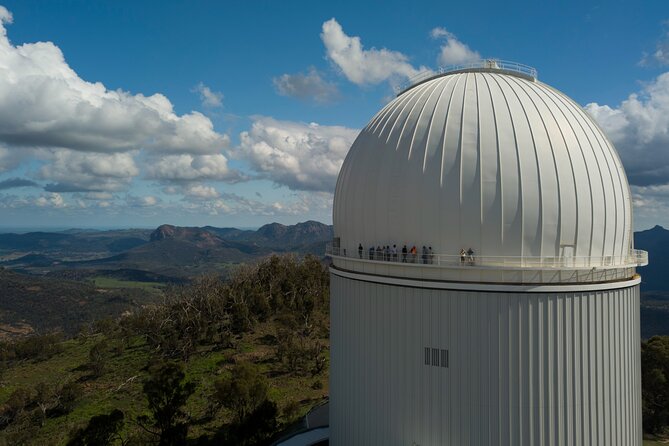
Your tour ends at Siding Spring Observatory on Observatory Rd in Coonabarabran. The driving experience itself is the included part, and the tour is designed as a complete arc: start at the Visitors Centre, hit the big planet billboards along the way, then roll up to the observatory area.
The key point: the planet-drive audio tour is included, but entry or additional observatory activities are not. You can also purchase another audio tour that takes you around the observatory, but that’s separate from this package.
So think of the ending like this:
- If you want a quick astronomy hit, the drive alone may be enough.
- If you want more telescopes and on-site context, plan to add the observatory audio after you arrive.
Price and Value: $6.99 Per Group Adds Up Fast
At $6.99 per group (up to 15), this is priced like a budget-friendly add-on that punches above its weight. You’re not paying per person, so family groups and small friend clusters get standout value.
What you’re really buying isn’t just the audio. You’re buying:
- Lifetime access to the tour in English
- VoiceMap app support with offline access to audio, maps, and geodata
- Unlimited use before and after your booking date
- A self-guided format that works like a flexible itinerary—quick now, revisit later
That last bit is the sneaky value. If you’re spending time in the region anyway, you can run it once during your arrival day and again later in calmer conditions, or share it across a few different car rides.
The main “cost” to consider isn’t money—it’s your own smartphone and your time spent driving and stopping safely. Since the tour doesn’t include a phone or headphones, bring your own setup and you’ll avoid any last-minute annoyance.
Who Should Book This Solar System Drive
This tour fits best if you want astronomy without committing to a long museum-style schedule.
You’ll probably love it if you:
- enjoy road trips and want something more interesting than scenery alone
- travel with kids who like point-and-spot activities
- want a low-cost way to build astronomy context before or after spending time at the observatory
- like self-guided travel where you can slow down for photos or skip ahead if you’re in a hurry
You might approach it with more caution if you:
- hate relying on GPS directions for driving routes
- don’t like troubleshooting phone apps while on the road
- expect a full observatory visit included in the price (this is primarily a driving tour with billboard stops)
Should You Book It?
I think you should book this if you’re in the Coonabarabran area and you want a fun, flexible way to experience the scale of the solar system. The combination of huge 3D planet billboards, expert audio featuring Marnie Ogg and Fred Watson, and the easy “press start when you’re ready” format makes it feel like a well-thought-out road-trip companion.
Just plan for one thing: bring a charged phone, confirm your setup early, and be ready to use a basic map if directions seem unclear at the start or if GPS playback hiccups. Do that, and you’ll turn a drive into a story you can actually feel in your bones.
FAQ
Where does the Virtual Solar System Highlights driving tour start and end?
It starts outside the Coonabarabran Visitors Centre on Newell Hwy in Coonabarabran NSW. It ends at Siding Spring Observatory on Observatory Rd in the same town.
How long does the driving tour take?
The tour is listed as about 1 to 2 hours.
What’s included in the $6.99 per group price?
You get lifetime access to the tour in English, the VoiceMap app for Android and iOS, and offline access to audio, maps, and geodata.
What do I need to bring?
You’ll need your smartphone and headphones (the experience does not include them).
Does it work offline?
Yes. The tour includes offline access to audio, maps, and geodata.
Is this tour private?
Yes. It’s described as private, with only your group participating.
Is this experience refundable if plans change?
No. It’s non-refundable and cannot be changed for any reason.