
REVIEW · SYDNEY
Australia and New Zealand eSIM (3 to 30 days. Up to 45GB)
Book on Viator →Operated by Xplori · Bookable on Viator
Bad signal can ruin your first day. This Australia and New Zealand eSIM is a simple way to stay in touch and get around without hunting for a SIM counter. You activate fast with a QR code and get 4G/5G data at local rates where available.
What I like most is how practical it is for real travel moments: emailing the eSIM to you in advance, then using it right away for maps, messaging, and checking in with friends and family. You also get to pick a plan that matches your schedule, from 3 to 30 days, and the data is meant to cover both countries.
The main thing to watch is setup. Activation can take a bit of time and may feel tricky, so make sure your phone supports eSIM before you leave—and if you’re unsure, contact Xplori ahead of time.
In This Review
- Key Things To Know Before You Buy
- Australia and New Zealand eSIM From Sydney: What This Is Really For
- Getting Your eSIM by Email and Activating With a QR Code
- My setup advice that keeps it painless
- 4G/5G Data, Local Rates, and the 3G Speed Switch
- Picking 3 to 30 Days: Matching Your Trip Length
- Choosing the right duration (quick reality check)
- Customer Service From Xplori: When Setup Feels Fiddly
- Price and Value: Is $5 Worth It for Two Countries?
- When this is a strong deal
- When you might consider another option
- Practical Tips for Getting Around and Staying Connected
- Who This eSIM Fits Best
- Should You Book This eSIM?
- FAQ
- How do I receive the eSIM?
- How do I activate the eSIM?
- Which phones are compatible with this eSIM?
- Does the data plan cover both countries?
- What network speeds are included?
- How long is the eSIM plan available?
- What if I need to cancel?
Key Things To Know Before You Buy
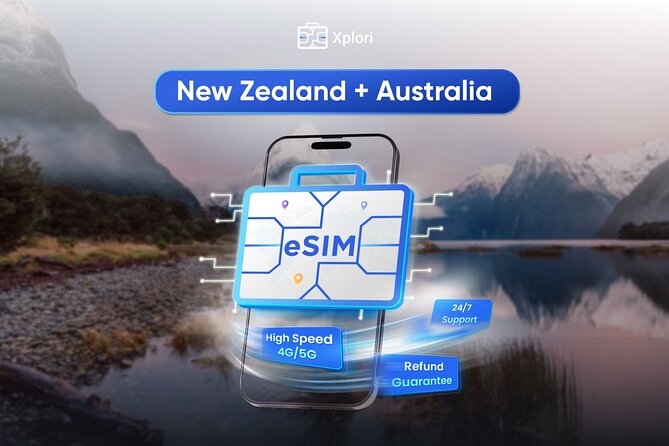
- Works across Australia and New Zealand on one data package
- Email delivery + QR activation so you do not need a physical pickup
- 4G/5G at local rates where the networks support it
- Data cap applies, then speeds switch to 3G
- Remote support by email from Xplori if activation gets difficult
- Device compatibility matters: you must have a phone that supports eSIM
Australia and New Zealand eSIM From Sydney: What This Is Really For
This is not a sightseeing tour with a bus route and scheduled stops. It’s a connectivity product designed for the part of travel that quietly causes stress: getting online quickly when you land, and keeping your phone useful all trip long.
The experience is listed as starting in Sydney, Australia, and ending back at the meeting point—but in practice, there’s nothing to meet. Your “start” is your email. Your “journey” is your phone doing what you need it to do: stay connected, help you plan, and help you navigate while you’re moving around.
That focus is valuable because connectivity is where small delays turn into big headaches. If your phone is offline for even part of day one, you can lose time rebooking, checking transport, or simply confirming plans. This eSIM is built around that exact problem: get you connected within minutes after scanning the QR code.
You can also read our reviews of more tours and experiences in Sydney.



Getting Your eSIM by Email and Activating With a QR Code
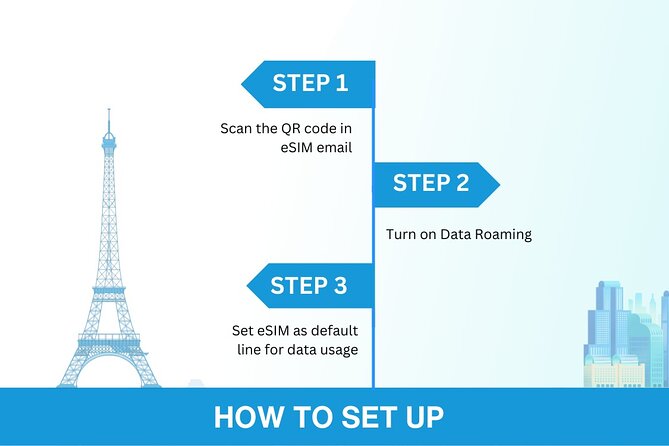
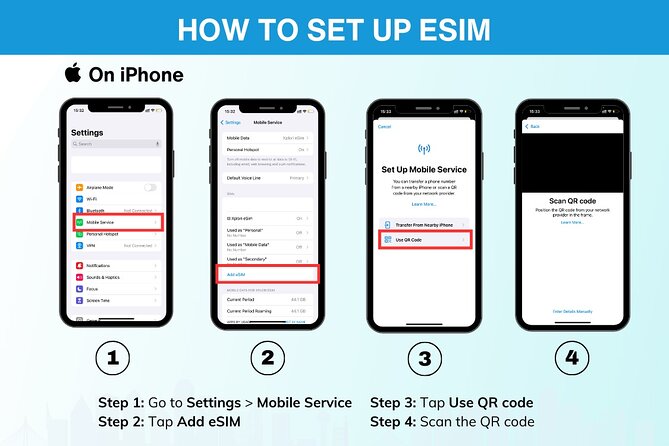
After ordering, the eSIM is delivered to you by email. Inside that message, you’ll use a QR code to activate the profile. The whole point is speed: scan the code, follow the prompts on your phone, and you should be connected within minutes.
Here’s the practical value for you: you can do the setup in the comfort of home or at your hotel before you’re rushed. That matters because you do not want to be figuring out eSIM settings with airport noise and spotty Wi‑Fi.
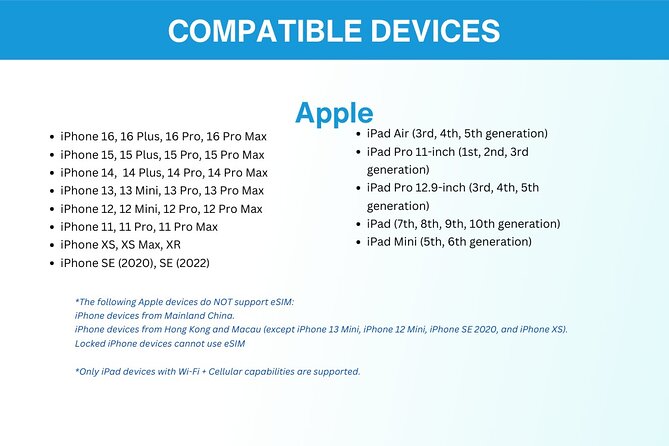
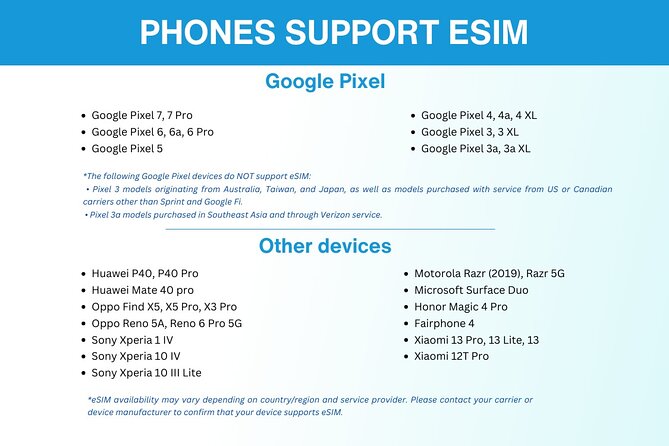
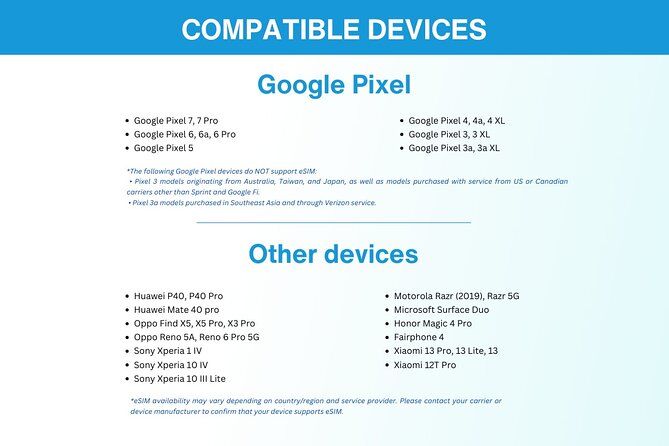
A key detail: the phone needs to support eSIM technology. The product lists examples like iPhone XS and later, Pixel 3 and later, and Samsung S20/S21/Fold. If you have one of those models (or another eSIM-capable device), you’re likely in good shape. If you are unsure, Xplori suggests contacting them in advance.
My setup advice that keeps it painless
- Test the activation process while you have stable Wi‑Fi and time to troubleshoot.
- Keep the email with the QR code handy and do not delete it.
- Make sure you can access your phone settings quickly once you start.
4G/5G Data, Local Rates, and the 3G Speed Switch
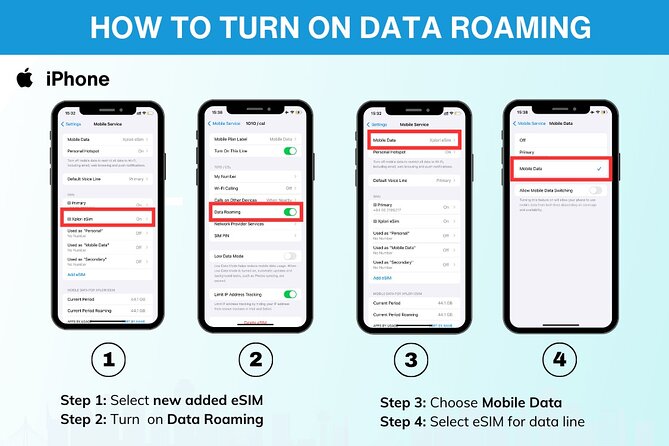
This eSIM is built for everyday connectivity with 4G/5G data (where available) and local rates. That wording matters. For many international trips, the issue isn’t just having data—it’s having predictable, usable data without surprise pricing.
The product also addresses a common fear: losing connectivity or being stuck with unusably slow speeds. It notes that the data plan includes an “always on” fallback: once you reach the mentioned data cap, the speed switches to 3G rather than cutting you off.
What that means for you in real terms:
- While you’re under the cap, you should have enough data for navigation, messaging, and trip planning.
- After the cap, you may still be connected, but heavy use (like frequent video streaming or large uploads) will likely feel slower.
Also note the plan is advertised as up to 45GB for the selected duration. The exact amount you get depends on which option you choose (3–30 days), so when you’re deciding, think honestly about how you use data:
- If you mainly use messaging and maps, you may stretch more easily.
- If you rely on lots of media, you’ll want to pick a longer plan and manage usage.
Picking 3 to 30 Days: Matching Your Trip Length
The flexibility here is one of the smartest parts. You can choose an eSIM for 3 to 30 days, based on how long you’ll be in the region. And the plan covers both Australia and New Zealand, which is ideal if your itinerary crosses the Tasman Sea.
Why that matters: it prevents the classic “I bought the wrong SIM for the wrong leg” problem. With one package for both countries, you avoid swapping providers mid-trip and you avoid hunting down new activation steps.
- Blue Mountains Small-Group Tour from Sydney with Scenic World,Sydney Zoo & Ferry
★ 5.0 · 3,709 reviews



Choosing the right duration (quick reality check)
- Short trips (around 3–7 days): good if you mostly need maps and communication, not constant streaming.
- Medium trips (1–3 weeks): a safer bet if you’ll use data daily for planning and day-to-day logistics.
- Long trips (closer to 30 days): best if you want fewer worries about data limits and expect more frequent usage.
Also consider timing. The average booking window is about 39 days in advance. That’s a small hint that planning ahead helps—because you’ll get the email earlier, and you can activate before you’re stressed.
Customer Service From Xplori: When Setup Feels Fiddly
The product includes remote customer service via email. It also includes a written guide in English. That might sound basic, but for eSIMs, it’s a big deal. Activation issues are often about device settings and permissions, not the data plan itself.
One of the best themes from feedback is trust: the product works properly, and the company responds well when questions come up. At the same time, the feedback points out a real-world drawback: installation can take time and might be a bit difficult.
So here’s how to turn that into a win for you:
- If you’re traveling soon, activate early. Don’t wait until the moment you land.
- If you hit trouble, contact Xplori by email right away. Remote support is included, and the written guide should help you work through steps at your own pace.
This is the kind of product where calm prep beats panic troubleshooting. A few minutes of setup time now can save you hours of frustration later.
Price and Value: Is $5 Worth It for Two Countries?
At $5 per person, the value proposition is hard to ignore. That’s usually where airport SIMs start feeling expensive—plus the added friction of lines, language barriers, and the time it takes to get everything activated.
This eSIM is positioned as cheaper than buying at the airport. It also aims to remove the hassle factor. For many people, airport SIM counters are not only pricey; they also steal time right when you want to be on the move.
But I’d also ground expectations for you: eSIMs like this are about getting the connection up and running quickly and keeping your phone functional. They are not magic data. The plan is capped, and once you hit the cap, your speed drops to 3G. If you’re a heavy data user, the “up to 45GB” detail is the number to watch while you choose your trip length.
When this is a strong deal
- You want connectivity from the start, without airport delays
- You’re traveling between Australia and New Zealand
- You’re okay managing data usage once you near the cap
When you might consider another option
- You need lots of high-bandwidth data every day (video-heavy travel, constant large uploads)
- You tend to overshoot data limits without checking usage
Practical Tips for Getting Around and Staying Connected
The whole point of this plan is practical: stay connected with loved ones, and use your data for navigating and trip planning. In day-to-day travel, that usually means:
- Checking maps and routes on the go
- Messaging friends or family without hunting for Wi‑Fi
- Making last-minute plan tweaks using online info
A smart way to use your time wisely is to think of connectivity as your travel “control panel.” The faster you get online, the faster you can decide. That’s where eSIMs earn their keep.
Also, since this is an eSIM product, it’s worth planning for the simplest operational reality: you’ll want your phone battery healthy and your settings understood enough to activate confidently.
Who This eSIM Fits Best
This works best if you:
- Have an eSIM-capable phone (like the models listed in the product info)
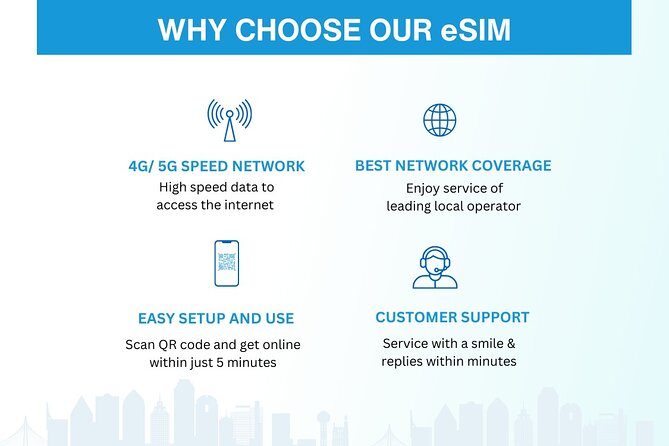
- Want 4G/5G data at local rates in both Australia and New Zealand
- Prefer setup via email and QR instead of airport purchasing
- Are comfortable with a capped data plan and the 3G speed fallback
It’s also a good match for people who hate awkward “SIM desk” conversations after a long flight, and for anyone who wants to get their bearings fast using their own phone.
The product notes that most travelers can participate. In other words, if your device is compatible, you’re likely good to go.
Should You Book This eSIM?
Book it if you want an easy, low-cost way to stay connected across Australia and New Zealand without airport hassles. The quick QR activation, email delivery, and included English written guide make it a strong option for travelers who value speed and convenience.
Skip it or double-check first if you know your phone isn’t eSIM-friendly, or if you tend to run into device setup problems and don’t have time to troubleshoot before your trip. The experience is very likely to work well, but the one caution is the setup can take a bit of effort.
If you plan a little ahead—activate before you’re in a rush, and keep your email handy—you’ll probably feel the biggest benefit on day one, when you need your phone most.
FAQ
How do I receive the eSIM?
You receive the eSIM by email after you order. The email includes the info you need to activate the profile.
How do I activate the eSIM?
Activate it by scanning the unique QR code provided with your email. The product says you can be connected within minutes after activation.
Which phones are compatible with this eSIM?
You need a phone that supports eSIM technology. Examples given include iPhone XS and later, Pixel 3 and later, and Samsung S20/S21/Fold.
Does the data plan cover both countries?
Yes. The data plan covers Australia and New Zealand.
What network speeds are included?
The eSIM includes 4G/5G data where available. After you use the included data amount, speeds switch to 3G.
How long is the eSIM plan available?
You can choose a duration of 3 to 30 days.
What if I need to cancel?
Free cancellation is available. You must cancel at least 24 hours before the experience’s start time for a full refund.




More Tour Reviews in Sydney
- Blue Mountains Small-Group Tour from Sydney with Scenic World,Sydney Zoo & Ferry
★ 5.0 · 3,709 reviews